uni-pdf Version 1.0 · Free
The safest way to move between PDF and images.
uni-pdf is a free offline PDF converter that turns PDFs into images, images into PDFs, and lets you rearrange PDF pages. Its biggest difference is security.
Your files never leave your computer
Online PDF converters upload your files to their servers to process them. uni-pdf is different. Every conversion happens entirely on your own PC, and files are never uploaded to the internet. Even sensitive documents — contracts, HR, finance — stay safely on your machine. It works with no internet connection at all.
What this offline PDF converter can do
- PDF → JPG — Save each PDF page as an image. Give it a name and it saves them in order as
name_1.jpg,name_2.jpg. It keeps the original resolution, so images don’t come out blurry. - JPG → PDF — Combine several images into a single PDF, in the order you choose.
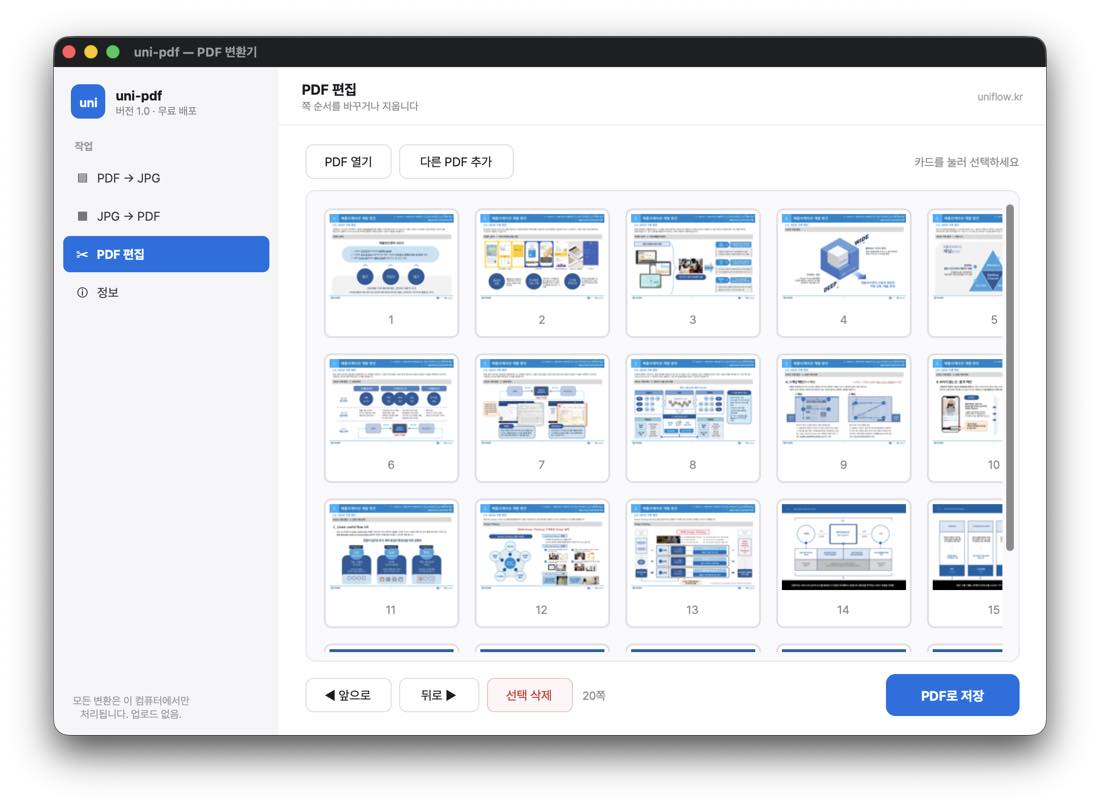
- Edit PDF — See pages as thumbnails to reorder or delete them, and merge with other PDFs.
No install · completely free
- A single executable you just download and run — no installation. Easy even if you’re not comfortable with computers.
- No ads · no payment · no data collection.
- Windows · macOS.
- Interface language — Korean only for now. The app was built for personal use first, so its buttons and labels are in Korean. The layout is simple enough to follow without reading, but an English interface is on the list.
Download
Heads up · the app’s interface is currently in Korean.
- Windows — Download uni-pdf-v1.0-windows.exe (~28MB)
- macOS — Download uni-pdf-v1.0-macos.zip (~24MB) · signed & notarized, opens with no warning.
Note · On Windows you may see an “unknown publisher / Windows protected your PC” warning. This is normal — the free build isn’t code-signed — and you can proceed with “More info → Run anyway.”
Tell us what you think
Share anything inconvenient or features you’d like at [email protected]. We’ll fold what’s needed into the next update.