Claude Design Handoff Explained — Concepts, Workflow, Tips, and Pricing
A practical guide to Claude Design handoff covering two export tracks, the closed-loop architecture with Claude Code, seven real-world tips, and plan-by-plan pricing breakdown.
Why Claude Design Handoff Deserves Its Own Guide
Claude Design handoff is the first real friction point teams encounter after adopting the tool. Claude Design launched as a research preview in April 2026 and quickly became a viable tool for real design work. Creating mockups and prototypes is intuitive enough, but the moment you try to share your work with a teammate, things get complicated fast.
The assumption that "sharing a URL just works" breaks down quickly — especially when your team uses individual accounts instead of an Enterprise plan. That friction is exactly what pushes you to understand how Claude Design handoff actually works under the hood.
This guide covers the two handoff tracks, the closed-loop architecture that makes Claude Design different, seven practical tips from real experience, and a clear pricing breakdown for teams considering adoption.
What Is Claude Design Handoff
Handoff is the act of converting design artifacts — mockups, guides, prototypes — into a format that matches the recipient's tools and context. Without proper handoff, a beautiful design stays trapped in the designer's environment.
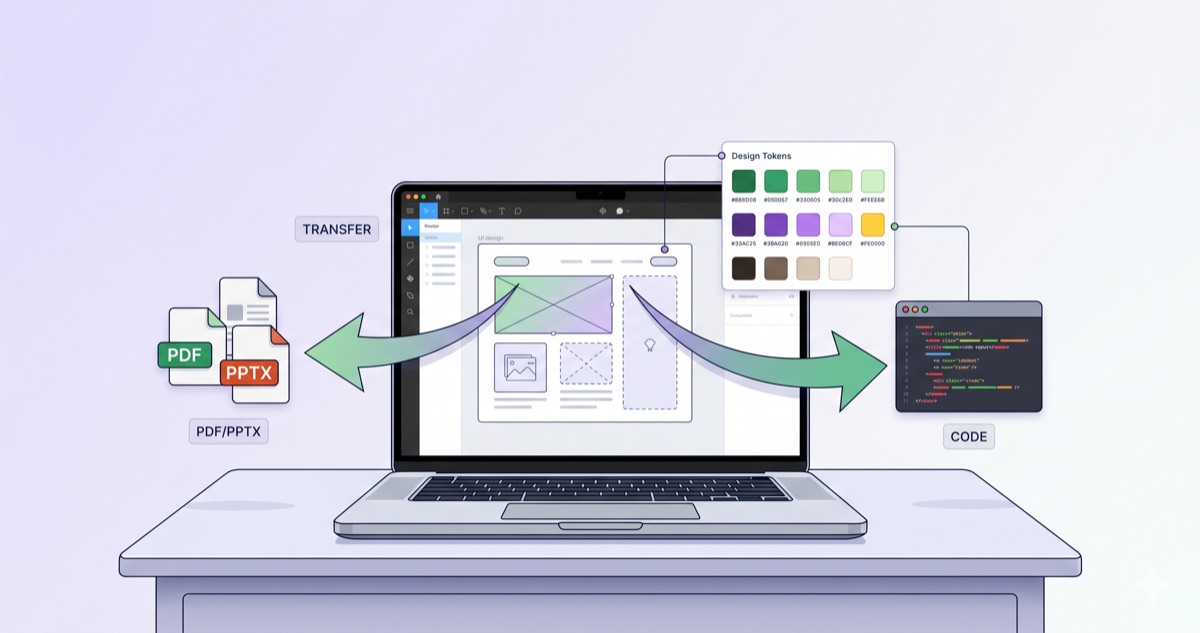
Claude Design provides two distinct handoff tracks.
Static Export
The first track creates snapshots of your design output.
| Detail | Description |
|---|---|
| Formats | PDF, PPTX, standalone HTML, Canva, org URL, .zip |
| Use case | Review, approval, presentations, documentation |
| Key point | Recipients do not need a Claude subscription |
Static exports are frozen in time. When you update your design system, previously exported files stay unchanged. This is the single most misunderstood aspect of Claude Design handoff.
Claude Code Handoff Bundle
The second track exports structured spec files that Claude Code can directly consume.
| Detail | Description |
|---|---|
| Format | Spec file (structured metadata) |
| Contents | Component structure, design tokens, layout hierarchy, referenced assets |
| Key point | Specification-driven implementation, not pixel copying |
The critical prerequisite: the receiving side must also use Claude Code for this track to deliver value.
The Closed-Loop Architecture
The most significant differentiator of Claude Design is that the producer (Design) and consumer (Code) share the same system. In traditional tools like Figma, a designer creates a mockup and a developer interprets it into code. Design intent gets lost in translation.
| Comparison | Open-loop (Figma, etc.) | Claude Design closed-loop |
|---|---|---|
| Design → code conversion | Human interprets and rebuilds | Claude Code reads the bundle directly |
| Interpretation loss | Occurs | Minimized |
| Design intent preserved | Weak | Strong |
The core concept: design artifacts and code artifacts exist within the same conversation, the same ecosystem. This advantage only materializes when the receiving side also uses Claude Code.
Design System Propagation — Auto-Inheritance and Manual Redeployment
When you create a design system in Claude Design, new prototypes automatically inherit its tokens and components. No additional configuration required.
But there is a critical constraint. Updating the design system does not automatically update existing prototypes or exported files. You must manually re-export.
Here is how it works:
- Design system change → automatically reflected in new prototypes
- Existing prototypes → manual re-export required
- Previously exported PDF/PPTX files → must be regenerated
Drop the "live update" assumption early. Export-based handoff is always a snapshot, and a design system change always means redeployment.
Seven Practical Claude Design Handoff Tips
Tip 1 — Match the Format to the Recipient
| Recipient | Recommended format | Why |
|---|---|---|
| Decision-makers (review/approval) | Static, supports comments, mobile-friendly | |
| Developers (writing code) | Standalone HTML | Interaction, styles, and structure fully extractable |
| Presentations | PPTX | Slides absorb naturally into decks |
| External partners (security-sensitive) | PDF + watermark | Visual delivery with leak control |
Tip 2 — Document Design Tokens Separately
HTML and PDF exports force recipients to extract token values from the content manually. Attach a separate token definition document to save everyone's time.
--color-primary: #FF6B35 (CTA buttons, accent text) --spacing-md: 16px (default card inner padding)
Tip 3 — Put Version Numbers in File Names
Example: DesignSystem_v1.4_20260506.pdf. Attach a one-line changelog. This eliminates the "is this the latest version?" question.
Tip 4 — Abandon the Live Update Fantasy
As explained above, export handoff always produces a snapshot. Design system changes require re-export and redeployment. Build this into your workflow from day one.
Tip 5 — Know When to Use Bundle vs. Static Export
If the receiving side runs Claude Code, the handoff bundle is overwhelmingly superior. If not, static export is the practical choice. When your team has both environments, prepare both.
Tip 6 — Start Small with Your First Handoff
Run the handoff cycle on a single screen or component first. Observe what the recipient understands, what they need more of, then define your standard handoff package based on that feedback.
Tip 7 — Formalize Sync Responsibility
Define a team rule: "When the design system changes, who re-deploys, and when?" Without this rule, one person will inevitably be looking at v1.4 while another works from a v1.2 export.
Claude Design Handoff Pricing by Plan
Claude Design has no separate price tag. It is included in all paid subscriptions (Pro and above) and unavailable on the Free plan. A previous post covered the credit drain problem in detail — when you factor in handoff workflows, choosing the right plan becomes even more important.
Plan Pricing and Claude Design Handoff Support
| Plan | Price | Claude Design | Handoff notes |
|---|---|---|---|
| Free | $0 | Not available | — |
| Pro | $20/mo | Available | Personal workspace only |
| Max 5x | $100/mo | Available | 5x Pro capacity |
| Max 20x | $200/mo | Available | 20x Pro capacity |
| Team Standard | $25/seat/mo | Available | Org sharing + member management |
| Team Premium | $100/seat/mo (annual) | Available | Org sharing + higher capacity |
| Enterprise | Custom | Available | Domain claiming + admin controls |
Credit Consumption Structure
Claude Design usage is metered separately from chat and Claude Code. Each user receives a weekly allowance that resets every seven days. Allowances are per-user — they are not pooled across the team.
Activities that consume credits:
- Design creation and refinement
- Chat-based design adjustments
- Attaching screenshots or images — these consume image tokens, which deplete the quota faster than text
Personal vs. Organization Accounts — Migration Caveats
Personal accounts (Pro/Max) and organization accounts (Team/Enterprise) cannot be merged, even with the same email. Data migration is not supported — only export is available.
- Team plans allow inviting new members only; existing personal data does not transfer
- Only Enterprise can absorb existing personal accounts via domain claiming
The practical decision tree: solo user → Pro, team of five or more → Team, company-wide rollout → Enterprise. If you start with a personal account and later switch to Team, your existing data will not carry over. Decide the scope upfront.
Key Takeaways for Claude Design Handoff
The essence of export-based handoff is separating the conversion step from the sync responsibility. Automatic live updates are not guaranteed, so formalizing a redeployment workflow within your team is the single most important action.
Claude Design's closed-loop architecture shines when the receiving side also uses Claude Code. Otherwise, static exports remain the most practical choice — just pick PDF, HTML, or PPTX based on who is receiving it.
Consistent design system management depends more on team rules than tool features. Define version naming, sync ownership, and redeployment cadence, and Claude Design handoff will work reliably in production. If you want to understand how credit limits compare across plans, the previous comparison post covers that in detail.