How to Use Custom Instructions on Grok — Workspaces, Agents, Memory, and Setup Guide
Yes, Grok has custom instructions. Learn how to set them up, use Workspaces for project separation, configure up to 4 Custom Agents, and manage Grok’s memory feature.
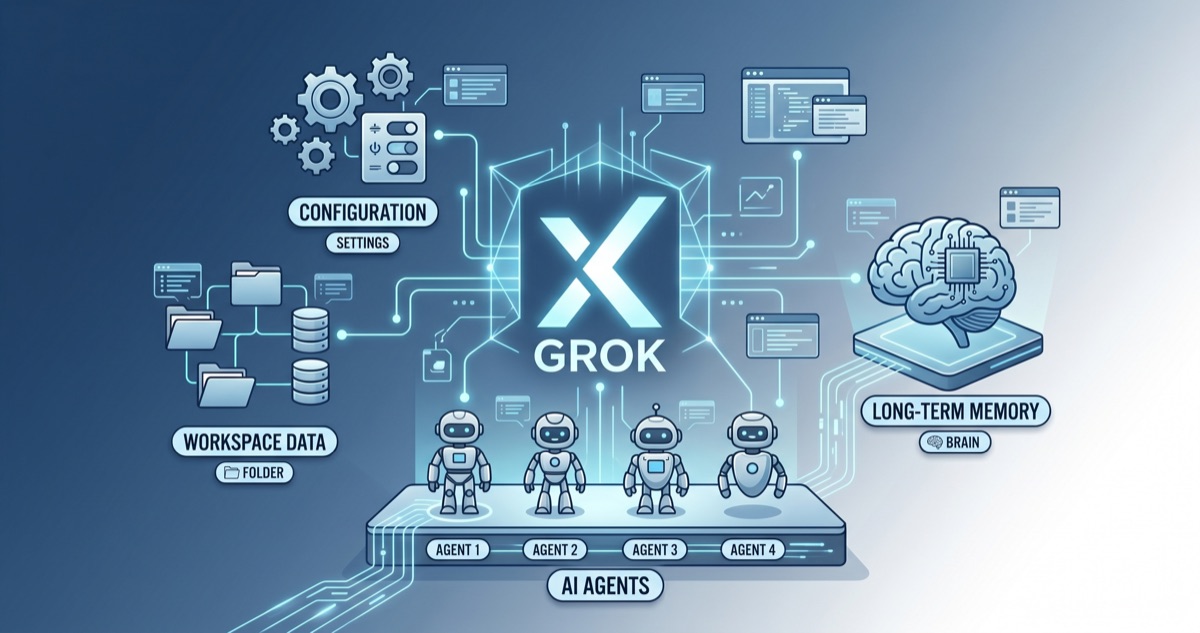
"Does Grok have custom instructions?" Yes, it does. Grok custom instructions work much like ChatGPT's Custom Instructions or Claude's project instructions — they let you set persistent context that applies to every new conversation. Since xAI rolled out the feature in late 2025, it has grown into a surprisingly complete system that includes Workspaces, Custom Agents, and a transparent Memory feature.
Here is everything you need to know to get Grok custom instructions working for you.
How to Set Up Grok Custom Instructions
Setting up custom instructions on Grok takes about two minutes.
- Log in at grok.com
- Click your profile icon or the settings menu in the lower-left sidebar
- Find the "Custom Instructions" section
- Type your instructions into the text box
- Save — every new conversation from this point forward will follow your instructions
What should you put in there? The same things that work on other platforms: your role and expertise, preferred response style (concise vs. detailed, formal vs. casual), languages you work in, and any recurring preferences.
Example: "I'm a frontend developer working mainly in TypeScript and React. Keep code examples in React. Be concise — lead with the answer, then explain if needed."
Character Limit and Key Caveats
The character limit for Grok custom instructions has had a bumpy history.
- Initially: up to 12,000 characters
- March 2026: slashed to 4,000 characters (widespread user complaints followed)
- April 2026: restored to 12,000 characters
At 12,000 characters, you have roughly four to five pages of plain text to work with. That is more than enough for most use cases, though power users managing complex workflows may still want to split things across Workspaces (more on that below).
One critical detail: changes to Grok custom instructions only apply to new conversations. If you update your instructions mid-session, the current conversation keeps using the old ones. Start a fresh chat to pick up the changes.
Workspaces — Separate Containers for Separate Projects
Workspaces are one of Grok's most distinctive features. They let you create independent environments within a single account, each with its own context.
Every Workspace includes:
- Its own custom instructions — different rules for different purposes
- Dedicated files — reference documents uploaded to that Workspace only
- Separate conversation history — no cross-contamination between Workspaces
For example, you might have a "Work" Workspace loaded with your company style guide and technical glossary, and a "Learning" Workspace with textbook summaries and study notes. Claude offers a similar concept through Projects, but Grok takes it a step further by fully isolating files and conversation history within each Workspace.
Tips for Using Workspaces Effectively
- Split by purpose — work, personal, learning, side projects
- Workspace-level instructions override your global custom instructions
- Pre-upload frequently referenced files to avoid repetitive copy-pasting
Custom Agents — Up to 4 Specialized Personas
Custom Agents let you create up to four specialized AI personas within a single Grok account. The default agents are Grok, Harper, Benjamin, and Lucas, and you can assign each one a distinct role.
A practical setup might look like this:
- Grok: general-purpose assistant (default)
- Harper: technical research (paper analysis, code review)
- Benjamin: business writing (reports, emails, presentations)
- Lucas: daily productivity (scheduling, brainstorming, task management)
This is conceptually similar to ChatGPT's GPTs, but the approach is different. GPTs are a marketplace — thousands of bots built by third-party developers that you browse and install. Grok's Custom Agents are a small, curated set that you configure yourself. The limit of four might sound restrictive, but in practice most people do not need more than three or four distinct modes.
Memory — Transparent and User-Controlled
Grok's Memory feature stores information it picks up from your conversations and reuses it in future chats. ChatGPT has something similar, but Grok stands out on transparency.
- Optional: you can enable or disable Memory entirely
- Visible: you can see exactly what Grok has remembered, listed as individual items
- Selectively deletable: remove specific memories without wiping everything
- Full reset available: clear all stored memories in one step
If custom instructions are "context you explicitly provide," Memory is "context the AI infers on its own." Using both together dramatically reduces repetitive explanations.
For more on how xAI designed this feature, see the official announcement on Maginative.
Grok vs. Claude vs. ChatGPT — Instructions Feature Comparison
A side-by-side look at how the three platforms handle persistent instructions makes the trade-offs clear.
| Feature | Grok | Claude | ChatGPT |
|---|---|---|---|
| Custom instructions | Yes (12,000 chars) | Project instructions (no published limit) | Custom Instructions (1,500 chars) |
| Project separation | Workspaces | Projects | GPTs / Projects |
| Specialized agents | Custom Agents (4) | None | GPTs (marketplace) |
| Memory | Yes (transparent) | None | Yes (limited visibility) |
| Instruction scope | New conversations only | Within project | New conversations only |
Claude's strength is tightly scoping instructions and files to a project. ChatGPT's advantage is the breadth of the GPTs ecosystem. Grok's differentiator is integrating Workspaces, Agents, and Memory into a single cohesive system.
For a deeper comparison of how to set up instructions across all three platforms, see the AI Custom Instructions Guide.
Which Platform Should You Pick?
If you only use one AI tool, match the platform to your primary need. Claude excels at scoping instructions and files to code projects. ChatGPT offers the widest ecosystem of third-party GPTs. Grok is the strongest choice if you want Workspaces, Agents, and Memory working together in a unified system. Using more than one platform is also a perfectly valid strategy.
The Bottom Line
Grok custom instructions go well beyond a simple text box. With Workspaces for project isolation, Custom Agents for role specialization, and Memory for automatic context accumulation, xAI has built a comprehensive personalization layer. The character limit is back to a generous 12,000, and the transparent approach to Memory management is something other platforms could learn from.
If you have not tried Grok's instructions yet, start with something simple — your role, your preferred style, and one or two recurring preferences. You will notice the difference in your very first conversation. For the bigger picture on AI instructions across platforms, check out the AI Instructions Complete Guide Series.