Gemini Spark — Google I/O 2026’s 24/7 AI Agent and Five Workflows to Hand Off (2026)
Gemini Spark is the 24/7 AI agent Google announced at I/O 2026. Runs in the background across Gmail and Workspace, executes long-running tasks on dedicated Cloud VMs, and reshapes how personal workflow automation gets defined.
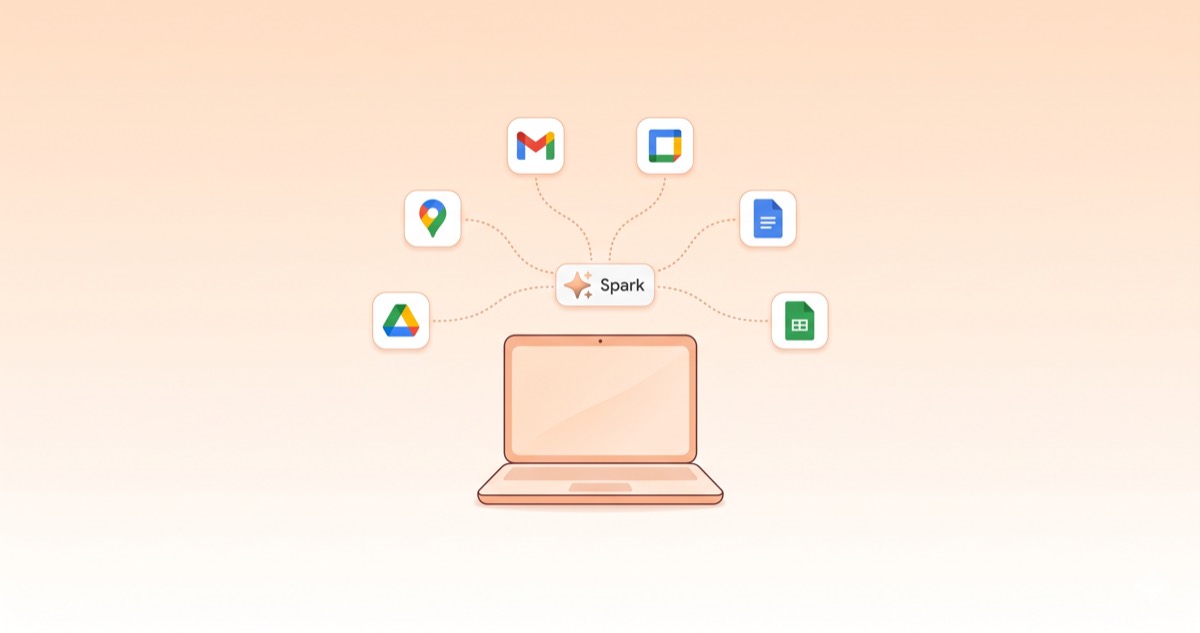
Gemini Spark — The Biggest Announcement at Google I/O 2026
Gemini Spark is the 24/7 AI agent Google introduced during the I/O 2026 keynote on May 19, 2026. Aimed at Gemini Enterprise and Workspace customers, it was framed as a "personal AI agent that takes action on your behalf, under your direction."
What makes the announcement notable isn't that yet another chatbot has been added to the lineup. It's that AI continuously running in the background has been pushed to the front as a deliberate product model. Even when your laptop is off and you're asleep, Gemini Spark keeps working on dedicated Google Cloud VMs. Sundar Pichai framed this as entry into the "agentic Gemini era."
This post pulls together exactly what Gemini Spark can do, how to get access, and where it fits most usefully into a real working week.
What Gemini Spark Can Do — 24/7 Background Automation
The surface area Gemini Spark operates on is essentially the whole Workspace: Gmail, Calendar, Drive, Docs, Sheets, and Maps, plus the general web through Chrome.
The most striking property is background operation. Once you've handed off a task, Spark continues working on a dedicated VM in Google Cloud. Closing your laptop or turning off your phone doesn't interrupt anything. You can ask it to triage your inbox and calendar overnight and find a tidied result waiting in the morning.
Task hand-off is also designed to be simple. Spark gets its own Gmail address; emailing that address is the same as giving it instructions. Results come back to your inbox. Later expansions will allow direct text or email instructions, custom sub-agent creation, and payment authority within preset spending limits and merchant lists.
Core capabilities in one list:
- Read and extract: Pulls facts from emails, docs, sheets, slides — drafts on top of them
- Scheduling: Triages calendar and inbox overnight, returns a tidy morning summary
- Long-running execution: Multi-step work continues uninterrupted on a Cloud VM
- Cross-app: Gmail, Calendar, Drive, Docs, Sheets, Maps + Chrome browsing
- Proactive updates: Surfaces important changes or decision points before you ask
Safety Mechanism — Explicit Approval for High-Risk Actions
A 24-hour autonomous agent immediately raises the question "what if it sends the wrong thing or makes the wrong decision?" Google has answered that directly in the design.
High-risk actions require explicit user approval to execute. Email sending is the canonical example. Spark drafts the body and gathers the recipients automatically, but the actual send button stays with you. Even when payment authority arrives later, it'll operate only within preset spending limits and an allow-list of merchants.
Spark also adopts a proactive update pattern. Rather than waiting for you to ask, Spark surfaces information first: "These two meetings collide next Tuesday at 2 PM," "This email needs a fast reply." That's the biggest behavioral difference from a typical AI chatbot — Spark speaks first, on its own initiative.
Pricing — A New $100 AI Ultra Tier and a Cut on the Top Plan
Gemini Spark access is gated to Google AI Ultra subscribers, and at I/O 2026 Google reshuffled the Ultra pricing structure itself.
| Plan | Before | After | Key benefits (Spark-related) |
|---|---|---|---|
| AI Ultra (top tier) | $250/mo | $200/mo | Spark + top quotas |
| AI Ultra (developer, new) | — | $100/mo | Spark + 5x Pro quotas + 20TB storage |
| AI Pro | $20/mo | $20/mo | Gemini Omni etc. (no Spark) |
Bundled side perks (YouTube Premium and similar) shift by region and Google reshuffles them often, so check the Google AI subscriptions page directly at purchase time.
Two things matter here.
First, AI Ultra's top tier dropped from $250 to $200 — a 20% cut. It reads as a competitive adjustment against the same price band (Anthropic Max $100, OpenAI Pro $100).
Second, and more consequential: a new $100 AI Ultra tier has been added. It's the mid tier for developers and heavy users, and it includes Spark beta access, 5x Pro quotas, and 20TB of cloud storage. Against Anthropic Max at the same $100 price point, the broader breadth of tools is the differentiator.
Spark's beta is rolling out to U.S. AI Ultra subscribers ($100 or $200) starting the week after May 19. There's no official Korea launch date yet, but Google's usual product pattern suggests expansion within months after the beta stabilizes.
Technical Foundation — Antigravity Agent Harness on Top of Gemini 3.5
Spark's underlying model is Gemini 3.5, and the agent loop is driven by the Antigravity agent harness. Antigravity is a separately announced agent execution framework — the core layer that handles tasks, skills, and schedules.
The architecturally interesting piece is execution on dedicated Google Cloud VMs. Unlike a regular chatbot that runs inside a user session, Spark has an always-on virtual machine handling a single user's work continuously. That's what enables work to continue regardless of the user's device state.
This is a different infrastructure model from chatbots and CLI tools, and the pricing reflects it. The AI Ultra subscription fee effectively includes the cost of a personal virtual machine.
Five Workflows to Hand Off — Where Gemini Spark Actually Fits
Feature lists in isolation can feel abstract. Five concrete scenarios for slotting Spark into a normal week:
1. Overnight inbox triage + next-day action list
Before bed: "Triage tomorrow's inbox — 5 emails I need to respond to, 3 items to add to my calendar." In the morning, the result is sitting in your inbox. The first 30 minutes of mail-sorting that used to start every day disappears.
2. Calendar collision pre-detection
Spark monitors the calendar continuously and flags overlaps or double-bookings before you notice them. "Two meetings collide next Tuesday at 2 PM — which one should I move?" arrives as a proactive nudge.
3. Meeting notes → report draft
Meeting transcripts or notes dropped into Drive get turned into Word/Slides drafts the same day. The human pass becomes review-and-refine, not start-from-scratch. The "one report per meeting" overhead shrinks dramatically.
4. Travel preparation automation
"Tokyo trip next week — schedule, hotel options, meeting routes, exchange rate summary." Spark pulls Maps, Calendar, and Chrome browsing together. Payments stay gated behind explicit approval.
5. Recurring report regeneration
Hand the weekly report — same template, fresh data — over to Spark. When new rows land in Sheets, Spark regenerates the report and prepares the team mailing list for sending. The send button still belongs to you.
The common thread across all five: the human keeps the "review" step, and everything else moves to the background. AI as a colleague sitting next to you, in the first concrete sense.
Where Gemini Spark Sits Next to Claude / ChatGPT / Grok
A short positioning summary against the other agents announced in May 2026:
| Agent | Released | Distinctive | Environment |
|---|---|---|---|
| Gemini Spark | May 19 | 24/7 background operation + full Workspace integration | Gmail, Calendar, Drive, Docs, Sheets, Maps, Chrome |
| Grok Imagine Agent Mode | May 1 | Infinite canvas + image/video generation | Grok Web |
| Grok Build CLI | May 14 | Terminal coding agent + native CLAUDE.md | macOS / Linux terminal |
| ChatGPT Agents (Codex etc.) | Stable | Code review agent + omnimodal | OpenAI ecosystem |
| Claude Code | Stable | 200K context + plan-then-execute | macOS / Linux terminal |
Gemini Spark's differentiator is that it operates across someone's entire personal work environment at once. Where other agents live on specific surfaces (terminal, canvas, code editor), Spark treats the digital workday as its surface area.
The trade-off is also clear: Spark operates inside the Google ecosystem. Notion, Slack, and most external SaaS aren't integrated. For someone not using Workspace, the appeal drops sharply. Gemini Spark is best understood as an agent optimized for teams already deep in Workspace.
If you're a Grok Build CLI or Claude Code user, Spark isn't a direct competitor. The natural pattern is: coding work stays on terminal agents, personal workflow automation moves to Spark — same direction as the broader picture in Grok's May 2026 update recap.
Where Gemini Spark Overlaps with n8n and Zapier
Approached from a different angle, Spark steps into territory long held by workflow automation tools like n8n, Zapier, and Make. A scenario I covered previously — automating receipt organization with n8n, where dropping receipt images into a Drive folder triggers OCR and Sheets organization — has clearly overlapping ground with what Spark can now do natively, without going as far as n8n.
Comparing both on the same receipt-organization scenario:
| Criterion | Gemini Spark | n8n |
|---|---|---|
| Receipt email → Sheets organization | ✅ One natural-language instruction | ✅ Possible (workflow built explicitly) |
| Trigger variety | Workspace changes + Spark mail address | Hundreds of external service webhooks/schedules |
| External SaaS integration | Google ecosystem mostly (others limited) | 1000+ integrations (banks, card APIs, SaaS) |
| Conditional branches and error handling | Natural-language instructions → AI judgment | Explicit node-level design → reliable |
| Operating cost | Bundled in AI Ultra subscription | Self-hosted OR n8n cloud |
| User onboarding | Very low (natural language) | Moderate (workflow design literacy needed) |
Overlapping territory: anything that completes entirely inside Workspace is now Spark territory. Receipt images coming in through Gmail attachments and landing tidied into Sheets, meeting notes landing in Drive and producing report drafts — these no longer need n8n.
Where n8n still fits better: external SaaS, API, banking, card networks, and proprietary system integrations — plus business-critical pipelines where exact conditional branching and error handling really matter. AI-judged flows are fast and convenient, but accounting and reconciliation work that demands the same outcome every time still benefits from explicit node design.
Gemini Spark as a Foundation Tool — Users Define the Workflow
Stepping back from the receipt scenario and the five workflows, Spark's true nature comes into focus. Spark isn't "a tool that provides specific features." It's a foundation platform that "runs whatever workflow the user defines, in the background."
Where earlier chatbots were "ask, get answered" tools, Spark is "a colleague you can delegate your repetitive work to." What you delegate is entirely your choice — organize receipts daily, generate the weekly report, classify new mail by priority and alert you. The platform doesn't dictate any of that.
That model has a clear implication: AI tools are increasingly tilting toward "user-side definition" as the central act. People who've spent time crafting CLAUDE.md, refining Custom Instructions and Custom Agents to fit their workflow — they walk into Spark with a low entry cost. The habit of "defining what to ask an AI to do" is already there.
The flip side: getting value from Spark requires first being explicit about what to hand off. The tool doesn't surface the answer. You have to see the repeating patterns in your own work before Spark can pick them up and move them into the background.
Bottom Line
Gemini Spark is the first concrete step from "an AI tool you call when needed" to "an AI colleague that works in the background." It also signals that some of the territory long held by workflow automation tools like n8n and Zapier is being absorbed into a single natural-language instruction. Teams already deep in Workspace have reason to try the beta the moment it lands; everyone else has reason to start by listing the repetitive work in their week and deciding what could be handed off. The new $100 Google AI Ultra tier lowers the price of admission considerably.